Router IP
192.168.1.254 Login Guide by ISP
Not working? Check the label on the back or bottom of your router.
192.168.1.254 is the gateway address favoured by big national ISPs. Telmex in Mexico, BT and EE in the UK, AT&T in the United States, Telus in Canada, MEO in Portugal, Bouygues Telecom in France and Fastweb in Italy all ship routers that sit at the top of the 192.168.1.x range instead of the bottom. Each ISP chooses its own username and prints its own password, so a 192.168.1.254 login only goes smoothly when you know where your provider puts it. This guide shows that for each one.

Default usernames and passwords
| Brand / model | Username | Password |
|---|---|---|
| Telmex (fibre ONT and modems) | TELMEX (in capitals) | On the label, marked "Contraseña (WPA)" |
| BT Smart Hub family (incl. Smart Hub 3) | Not used | Admin password on the hub settings card on the back |
| AT&T gateways | Not used | Device Access Code on the gateway label |
| Telus modems | See the modem label | On the modem's label |
| MEO (Portugal) | meo | meo |
| Fastweb FASTGate (Italy) | Not used | On the label on the back of the modem |
How to log in
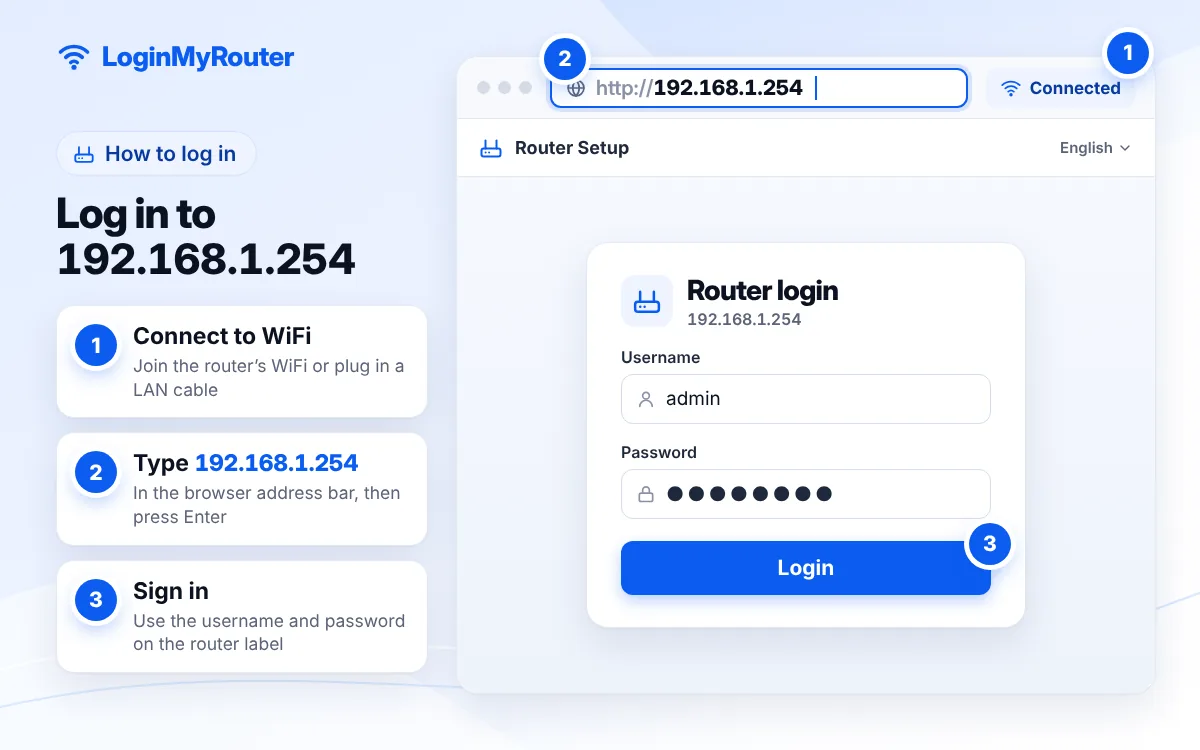
- Connect to your ISP router's WiFi or plug in an Ethernet cable.
- Enter 192.168.1.254 in the browser's address field.
- Look up your ISP in the table above to see which username and which printed code the login screen expects.
- Type the credentials exactly: Telmex wants TELMEX in capitals, and every password is case-sensitive.
- Make your change, press Save or Apply, and give the router a minute while it restarts WiFi.
Change the default admin password as soon as you're in.
Why 192.168.1.254 instead of 192.168.1.1?
Both are private addresses in the same 192.168.1.x network, and technically the router works the same on either. 254 is simply the last usable host in a standard /24 network (.0 names the network and .255 is the broadcast address), and several ISPs adopted the convention of parking the gateway at the top, leaving the low numbers for customer devices. The Subnet Calculator shows how the range is split.
One practical consequence: a device set up for a 192.168.1.1 network, such as a printer with a fixed address or a second router, can quietly conflict here. Keep that in mind if you bring equipment from another home.
ISP by ISP: where the login is
| ISP | Country | Shortcut | Where the password is |
|---|---|---|---|
| Telmex | Mexico | 192.168.1.254 | Label, "Contraseña (WPA)"; user TELMEX |
| BT Smart Hub | UK | 192.168.1.254 (Hub Manager) | Hub settings card on the back |
| EE Smart Hub | UK | 192.168.1.254 | Label on the hub |
| AT&T | USA | 192.168.1.254 | Device Access Code on the label |
| Telus | Canada | 192.168.1.254 | Modem label |
| MEO | Portugal | 192.168.1.254 | Default meo / meo |
| Bouygues Bbox | France | mabbox.bytel.fr | Label on the box, or ask Bouygues |
| Fastweb | Italy | myfastgate | Label on the back |
| Worldlink | Nepal | 192.168.1.254 | Label or ISP support |
In Mexico, Telmex is the big .254 user, while Izzi sits on 192.168.0.1 and Totalplay on 192.168.100.1. The Mexico hub compares them.
Find the gateway from the command line
A terminal gives the fastest, most reliable answer:
- Windows:
ipconfigand read Default Gateway. - macOS:
route -n get default; the gateway entry is your router. - Linux or ChromeOS Linux:
ip route; the address after "default via" is your router.
On a phone, open your WiFi network's details: iPhone calls it Router, Android calls it Gateway.
192.168.1.254 login problems: page not opening or password rejected
You're using your ISP account password
The most common mix-up. Your online account (Mi Telmex, your BT ID, your AT&T account) is not the router's admin login. The router wants the code printed on the box itself.
The router was swapped
ISPs replace hubs during upgrades. A new unit has a new sticker, so an old note on the fridge won't work.
You added your own router
If a personal router hangs off the ISP box, your gateway is now that router's address, perhaps 192.168.1.1 or 192.168.0.1. Connect to the ISP's WiFi to reach .254.
Some settings are greyed out
ISPs lock options such as the internet connection profile or VoIP. That's by design; contact the ISP for those changes.
Nothing loads at all
Turn off mobile data, check the cable or WiFi connection, and power-cycle the router: unplug it, count to thirty, plug it back in.
Change the WiFi password on an ISP router
Log in, then look for a menu called Wireless, WiFi, WLAN or "My network". Change the network name if you like, set a new key of at least 12 characters and save. Dual-band hubs may show the 2.4 GHz and 5 GHz settings together or on separate tabs. Many ISPs also offer a phone app that changes the WiFi password without opening 192.168.1.254 at all. Afterwards, the WiFi QR tool turns the new details into a scannable square for guests.
Security on ISP-supplied routers
- The sticker is a master key. Anyone who photographs it can join your WiFi or open the settings, so change the default WiFi key and keep the router out of public view.
- Change the admin password where your ISP allows it.
- Let the ISP's automatic firmware updates run, and restart the router every few weeks so they apply.
- Turn off WPS if the menu offers it.
Typed 1921681254 or 192.168.l.254?
Long addresses invite mistakes: 1921681254 without dots, 192-168-1-254 with dashes, 192.168.l.254 with a letter, or 192.168.1.25 cut short. The IP Typo Fixer repairs them and gives you a working link.
1921681254 → 192.168.1.254 192-168-1-254 → 192.168.1.254 192.168.l.254 → 192.168.1.254 192.168.1.25 → 192.168.1.254 192.168.1.254.1 → 192.168.1.254 192,168,1,254 → 192.168.1.254
Used by
 Telmex · Mexico
 BT Smart Hub · GB
- EE Smart Hub · GB
 AT&T · US
 Telus · CA
- MEO · PT
 Bouygues Bbox · FR
 Fastweb · IT
 Worldlink · NP
Frequently asked questions
What is the Telmex modem username and password?
Telmex tells customers to use TELMEX in capital letters as the username and the key marked "Contraseña (WPA)" on the modem label as the password. Our Telmex guide walks through the menus.
Where is the BT Hub admin password?
BT prints it on the hub settings card on the back of the Smart Hub. Type 192.168.1.254 to open Hub Manager and enter it when asked.
What is the AT&T Device Access Code?
It is the gateway's admin code, printed on the label on the side or bottom of the AT&T gateway. The settings page asks for it before saving changes.
Is my ISP account password the same as my router password?
No. Your account password signs you into the ISP's website or app. The router password is printed on the device and only works at 192.168.1.254.
Can I change the router's address from 192.168.1.254?
Most ISP routers allow it under LAN or DHCP settings, but there is rarely a reason to. If you change it, your devices will need to reconnect.
Why does 192.168.1.254 show a different brand than my ISP?
ISPs buy routers from manufacturers such as Huawei, ZTE, Sagemcom or Arcadyan and add their own branding. The login still follows the ISP's rules, not the manufacturer's defaults.