Router IP
10.0.0.1 Login: Piso WiFi and Xfinity Guide
Not working? Check the label on the back or bottom of your router.
10.0.0.1 is a private gateway address, and what answers it depends on where you are. In the Philippines it is usually the portal of a Piso WiFi vending machine, where you insert coins, watch your remaining time and pause your session. In the United States and Canada it is the admin page of an Xfinity or Rogers gateway. This 10.0.0.1 login guide covers both worlds: how to open the page, what each screen does, where the admin password is printed and what to try when nothing loads.
Default usernames and passwords
| Brand / model | Username | Password |
|---|---|---|
| Xfinity gateway (Admin Tool) | admin | On the sticker on the bottom of the gateway |
| Rogers Ignite gateway | admin | On the gateway label; you set a new one at first sign-in |
| Piso WiFi vendo portal (customers) | None needed | None needed |
How to log in
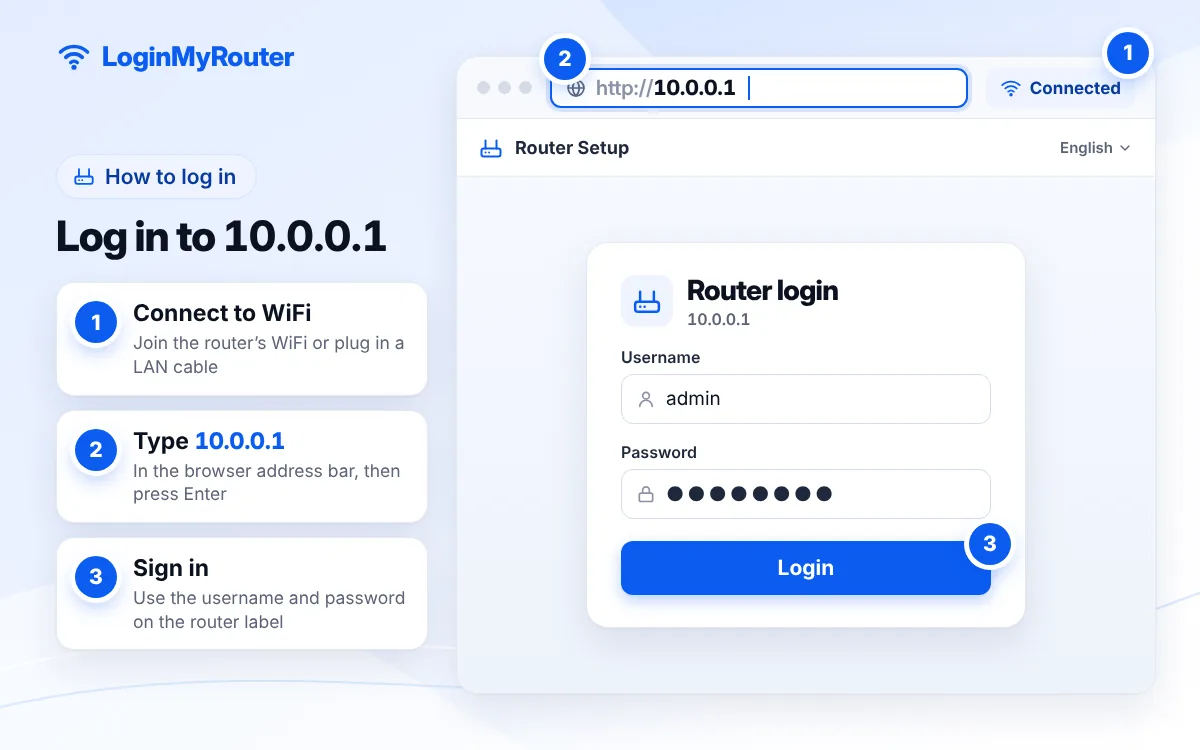
- Join the right network: the Piso WiFi hotspot name, or your own Xfinity or Rogers WiFi.
- Switch off mobile data for a moment so the browser cannot skip past the WiFi.
- Type 10.0.0.1 in the address bar and press Enter (Rogers asks for https://10.0.0.1).
- On a Piso WiFi portal you will see Insert Coin, your remaining time and Pause or Resume buttons; no password is required.
- On an Xfinity or Rogers gateway, sign in as admin with the password from the gateway sticker, then create your own password if asked.
- Xfinity customers who can't find WiFi settings in the Admin Tool should use the Xfinity app instead.
Change the default admin password as soon as you're in.
Piso WiFi at 10.0.0.1: coins, timer and pause
A Piso WiFi machine is a coin-operated hotspot found in sari-sari stores, apartment buildings and boarding houses across the Philippines. You connect to its WiFi, the portal opens (or you type 10.0.0.1), and each coin you drop in adds minutes to your device. The portal identifies your phone by its hardware (MAC) address, which is how it knows whose time is whose.
The Pause button freezes the countdown and cuts your internet so unused minutes are not wasted while you sleep or step away. When you are back, open 10.0.0.1 on the same phone and tap Resume. Pause only saves time you already paid for; it never adds minutes. How long a pause can last, and whether paused time expires, is set by each machine's owner, so rules differ from vendo to vendo. More local detail is in our Piso WiFi guide and the Philippines hub.
Keep your paid time attached to your phone
Modern phones can show each WiFi network a random MAC address. If that address changes, the vendo may treat you as a new customer and your remaining minutes seem to vanish. For the Piso WiFi network only, set iPhone's "Private Wi-Fi Address" to Off or Fixed (Settings, Wi-Fi, tap the (i)), or choose "Use device MAC" under the network's Privacy option on Android.
When a coin doesn't register
Stop inserting coins, note the time, and tell the store or machine owner; most vendos display a contact on the cabinet. Owners can see coin logs in their own admin panel, which customers don't have access to.
Xfinity and Rogers gateways at 10.0.0.1
Xfinity (Comcast) recommends its app first: the WiFi Details screen in the Xfinity app is the quickest way to check or edit the WiFi name and password, and on XB6 or newer gateways, or homes with Xfinity WiFi extenders, the app is the only place to change them. For everything else, open http://10.0.0.1 to reach the Admin Tool, sign in with the username admin and the password printed on the sticker under the gateway. Xfinity notes that Admin Tool access may need to be enabled first.
Rogers Ignite gateways in Canada run the same platform. Rogers tells customers to enter https://10.0.0.1, use admin and the password on the label, and create a new admin password at the first sign-in.
Some cable gateways from Claro/NET in Brazil also use this range; check our Claro/NET guide if yours does.
Confirm the gateway on your phone or laptop
Most Piso WiFi users are on phones, so start there. On an iPhone, tap the (i) next to the connected network and read the Router line. On Android, open the network's details and look for Gateway; some models hide it behind an Advanced toggle. On a Windows laptop, run ipconfig in Command Prompt and read Default Gateway; on a Mac, look in System Settings under Network, Wi-Fi, Details, TCP/IP. If the result is 10.0.0.138, 10.0.0.2 or a 192.168 address, use that page instead.
10.0.0.1 login problems and quick fixes
The Piso WiFi portal won't pop up
Type 10.0.0.1 manually. If nothing appears, forget the network and rejoin it. On Android, a custom Private DNS setting can stop the portal from loading, so set it to Automatic while you use the vendo.
You see an "Insert Coin" page at home
Your phone joined a neighbour's vendo hotspot instead of your own WiFi. Pick your home network and remove the vendo from saved networks.
Xfinity says the password is wrong
Someone may have changed it since installation. You can manage WiFi from the Xfinity app without it. Pressing the gateway's pinhole Reset button for roughly 30 seconds returns it to factory settings: the sticker password works again, but your custom WiFi name and password are wiped.
The page loads but looks broken
Empty the browser cache, or open the page in another browser. Old gateway firmware sometimes struggles with the newest browsers.
Typed 10.0.0.0.1 or 10.0.1?
The most common slip here is an extra zero: 10.0.0.0.1 has five numbers, which no IPv4 address can have. 10.0.1 and 10.0.0.l fail too. The IP Typo Fixer converts any of these into the proper address and links straight to it.
10.0.0.0.1 → 10.0.0.1 10.0.1 → 10.0.0.1 10.0.0.l → 10.0.0.1 10.0.0.1.1 → 10.0.0.1 10.o.o.1 → 10.0.0.1 10,0,0,1 → 10.0.0.1
Used by
 Piso WiFi vending machines · Philippines
 Xfinity (Comcast) · US
 Rogers Ignite · CA
 Claro / NET (some gateways) · Brazil
Frequently asked questions
Does pausing Piso WiFi give free time?
No. Pause only stops the countdown on minutes you have already paid for, so you can use them later. The machine owner decides how long a pause may last.
Why did my Piso WiFi time disappear after I reconnected?
Usually your phone presented a new random MAC address, or the owner's time limit for paused sessions ran out. Turn off the private or random address for that network and ask the owner about the pause rules.
What is the Xfinity admin password at 10.0.0.1?
The username is admin; the password is printed under your gateway. If it was changed and forgotten, manage WiFi in the Xfinity app or reset the gateway.
Can I change my Xfinity WiFi password without 10.0.0.1?
Yes. Xfinity recommends the app's WiFi Details screen, and on XB6 or newer gateways the app is the only way to change the WiFi name and password.
Do I need internet to open 10.0.0.1?
No. The page comes from the device on your network, so it opens even with no mobile load and no internet, which is exactly how you buy more Piso WiFi time.
Is 10.0.0.1 safe?
The address itself is harmless; it never leaves your local network. What matters is who controls the device behind it, so only enter passwords on gateways you own.