Router IP
192.168.254.254 Login for Globe At Home Modems
Not working? Check the label on the back or bottom of your router.
192.168.254.254 is the admin address printed on many Globe At Home modems in the Philippines, including a lot of the prepaid WiFi units sold in malls and online. To log in, connect to the modem's WiFi, open http://192.168.254.254 in a browser and type the default username and password from the sticker on the modem. The page loads even when your prepaid load has run out, because it lives on the modem itself, not on the internet.
Once inside you can rename your network, set a stronger WiFi password, see which phones are connected and check the signal your modem is getting.
Default usernames and passwords
| Brand / model | Username | Password |
|---|---|---|
| Globe At Home modems (prepaid and postpaid) | Printed on the modem sticker | Printed on the modem sticker |
How to log in
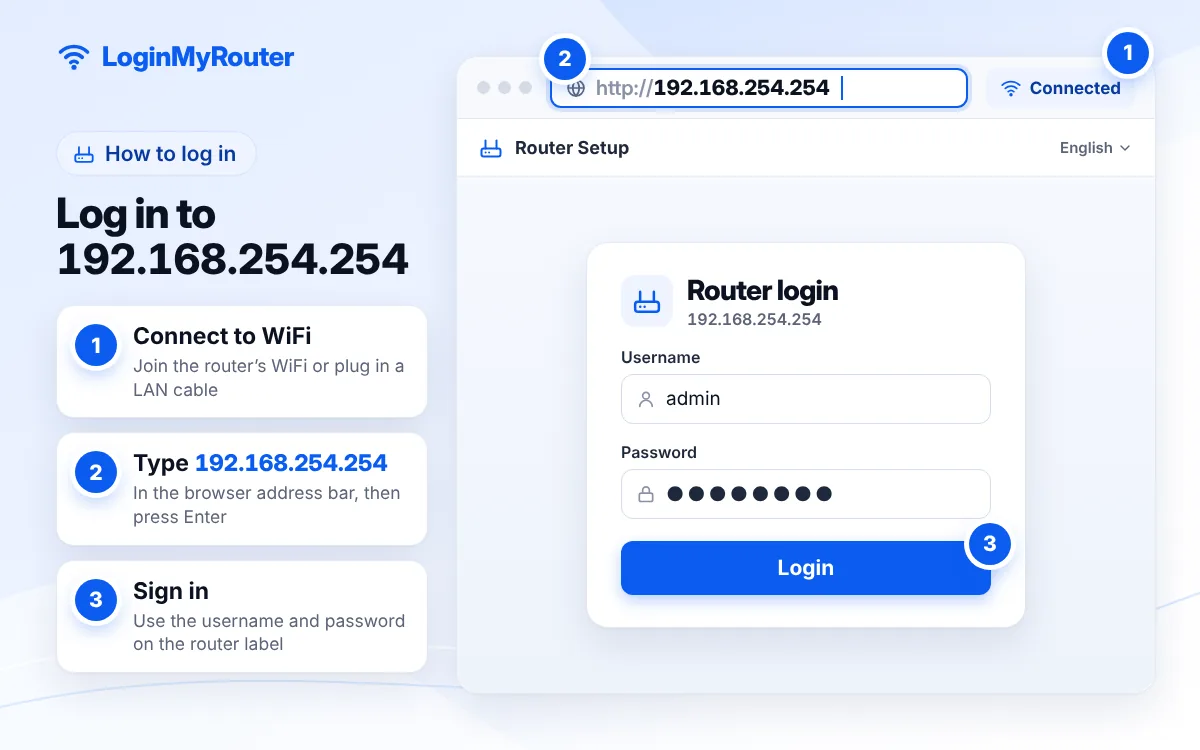
- Switch on the modem and wait until the power and signal lights stop blinking.
- Connect your phone or laptop to the modem's WiFi using the network name and WiFi password on the sticker.
- Turn off mobile data on your phone so the browser uses the modem.
- Open Chrome, Safari or any browser and type 192.168.254.254 in the address bar (not the search box).
- Enter the default username and password shown on the sticker, then tap Login.
- If asked, create a new admin password and save it in your notes or password manager.
Change the default admin password as soon as you're in.
What is 192.168.254.254?
It is a private address that only works inside your home network. Every router has one, and Globe chose this number for many of the modems it supplies, while most Philippine fiber providers such as PLDT and Converge use 192.168.1.1. That is why advice written for other networks often fails on a Globe device.
Globe itself tells customers to read the modem's IP address, default username and default password from the sticker, so treat the label as the final word. Some Globe fiber units and pocket devices use a different address, such as 192.168.1.1 or 192.168.8.1.
Who uses this address
Search interest for 192.168.254.254 comes overwhelmingly from the Philippines, almost always together with the words "Globe At Home". Our Globe At Home router login guide covers the brand in more depth, and the Router Finder shows the default address for every Philippine provider we track, including pocket WiFi devices.
Not sure your modem uses it? Check the gateway
Android
Open Settings > WiFi, tap the network you are connected to and look for Gateway or Router. On some phones you need to tap Advanced or View more first.
iPhone
Go to Settings > Wi-Fi and tap the (i) icon. The Router line shows the address.
Windows laptop
Press Windows + R, type cmd, press Enter, then run ipconfig. The Default Gateway is your modem.
Mac
Hold Option and click the WiFi icon in the menu bar. The Router entry is the address you need.
Page won't load? Try this
- Mobile data is still on. Your phone may be sending the request over Globe's mobile network instead of the modem. Switch data off and try again.
- Wrong network. Neighbours often have a similar Globe network name. Check you joined the SSID on your own sticker.
- Typed in the search bar. Some browsers turn the number into a Google search. Add
http://in front. - Modem still booting. Give it two minutes after a power cut.
- Different address. If the gateway check shows another number, use that.
- Password rejected. Someone may have changed it. A reset (below) restores the sticker details.
Reset to the sticker password
Find the small RESET hole, usually at the back or underside. With the modem powered on, press it with a pin for about 10 seconds (some models need a little longer) until the lights flash, then wait a few minutes. All changes are erased: the WiFi name, WiFi password and admin password go back to what the sticker says. A reset does not remove your load or promo.
Change your WiFi name and password
- Log in at 192.168.254.254.
- Open the WiFi or WLAN settings section (sometimes under Settings > WiFi or Network > WLAN).
- Change the SSID to a name that does not reveal your surname or unit number.
- Pick WPA2-PSK (or WPA2/WPA3) and enter a password of at least 12 characters.
- Save. Your phone will disconnect; reconnect with the new password.
Want visitors to join without spelling out the password? Create a code with our WiFi QR Code Generator and print it for the fridge.
Better signal from a Globe LTE modem
Prepaid WiFi modems run on the mobile network, so placement matters more than with fiber. Set the modem near a window, off the floor and away from the microwave. Many units show signal readings on the status page; move the modem a little, refresh, and keep the spot with the best numbers.
Security basics
- Replace the default admin password with your own.
- Never share the admin password with people who only need WiFi.
- Remove devices you do not recognise from the connected list, then change the WiFi password.
- Install firmware updates if the modem offers them.
Typed it wrong?
Long addresses invite slips like 192.168.254.25 or 192.168.245.254. Paste yours into the IP Typo Fixer and it will correct it instantly.
192.168.254.25 → 192.168.254.254 192.168.245.254 → 192.168.254.254 192.168.254.2554 → 192.168.254.254 192.l68.254.254 → 192.168.254.254 192.168.25.254 → 192.168.254.254
Used by
 Globe At Home (prepaid WiFi and many postpaid modems)
 Frequently asked questions
What is the default password for 192.168.254.254 on Globe At Home?
Globe prints the default username and password on the modem sticker, and they can differ by model. Use the sticker values; if they were changed, reset the modem to restore them.
Can I log in without load?
Yes. The admin page is stored on the modem, so it opens whenever you are connected to the modem's WiFi, even if your data or promo has expired.
Why does my Globe modem not open 192.168.254.254?
Your model may use another address. Check the sticker or the gateway on your phone; 192.168.1.1 and 192.168.8.1 are the usual alternatives.
Will a reset delete my prepaid load?
No. A reset clears settings stored on the modem, such as the WiFi name and passwords. Your load and promos are tied to your account and SIM.
How do I see who is connected to my Globe WiFi?
Log in and open the device list, often called Connected Devices, DHCP Clients or Station List. Unknown devices are a sign you should change your WiFi password.
Is 192.168.254.254 used outside the Philippines?
It appears on some devices elsewhere, but in practice almost everyone looking it up is a Globe At Home customer.