 Philippines · Provider
Globe At Home Router Login and WiFi Password Change
- Login URL
http://192.168.254.254- Default username
- Printed on the back of the modem
- Default password
- Printed on the back of the modem
- Other possible IPs
- 192.168.1.1
Globe At Home login takes a couple of minutes. Many Globe modems open their settings at http://192.168.254.254, and Globe's own guide for Home Prepaid WiFi uses http://globebroadband.net, which takes you to the modem dashboard while you're connected to its WiFi. Globe says the default username and password are printed on the back of the modem.
Below: how to log in, how to change the Globe At Home WiFi password and name, what the GlobeOne app is for, and how to reach Globe when the problem is the line, not your settings.
How to log in
- Connect your phone or laptop to the Globe At Home WiFi.
- Check the back of the modem for the default username and password.
- Open a browser and go to http://192.168.254.254. On Home Prepaid WiFi, Globe's guide uses http://globebroadband.net instead.
- Click Login and enter the username and password from the back of the modem.
- If neither address works (common on newer fiber modems), try http://192.168.1.1 or check the Gateway in your phone's WiFi details.
Not working? Check the label on the back or bottom of your router.
How to change the WiFi password
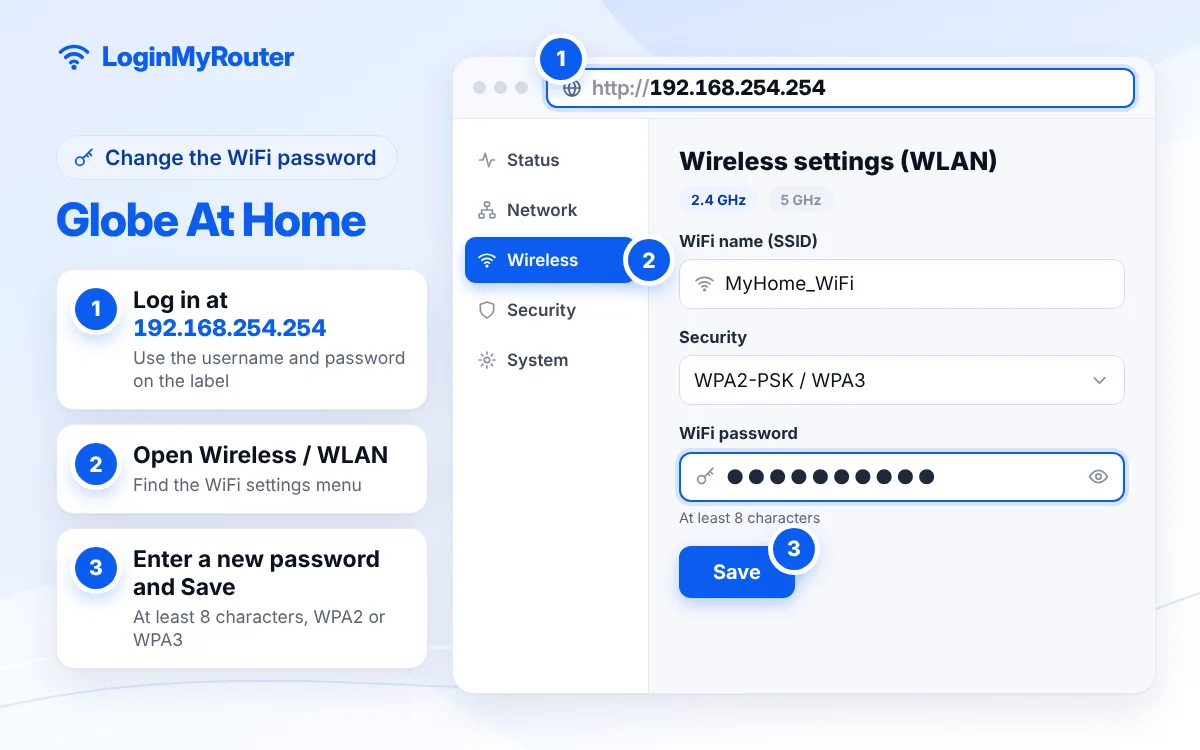
- Log in to the modem dashboard.
- Open the drop-down menu at the top left and go to WLAN.
- Select WLAN Basic Settings.
- Type a new network name if you want, then enter the new WiFi password (WPA2, at least 8 characters).
- Click Apply and reconnect your devices with the new password.
Change the default admin password as soon as you're in.
Globe At Home login: which address to use
| Device | Address |
|---|---|
| Globe At Home Home Prepaid WiFi | globebroadband.net (Globe's guide) |
| Many older Globe At Home modems | 192.168.254.254 |
| Other or newer models | 192.168.1.1 or the address on the label |
“192.168.254.254 Globe At Home login” and “192.168.254.254 password” are some of the most common searches in the country; our 192.168.254.254 guide explains the address in detail. The WLAN steps on this page come from Globe's Home Prepaid WiFi guide; other models use similar menu names.
What the GlobeOne app is for
Globe describes GlobeOne as the app to manage your Globe At Home account, pay bills and get support. GFiber Prepaid users can register, load and request a repair there, and Home Prepaid WiFi promos can be registered through it. Globe doesn't list a WiFi password change in the app, so use the modem dashboard above for that.
Globe's own tips for Home Prepaid WiFi
- Leave the SIM in the modem and don't tamper with it.
- Place the modem on a flat, open surface where the signal is strong, away from TVs, radios and refrigerators.
- Use only the original power adapter, and keep the modem indoors.
- Keep the vents free of dust.
See connected devices and reset
The dashboard's status or WLAN pages usually list connected devices with their MAC addresses; change the WiFi password if you find strangers. A restart fixes most slowdowns. A factory reset with the pinhole (about 10 seconds) restores the login and WiFi details on the back of the modem, so only do it if you can't log in. Afterwards every device has to rejoin the default network printed on the label, so set your own WiFi name and password again straight away.
Contacting Globe
Globe's contact page lists 211 from a Globe mobile, 808 from TM and (02) 7730-1000 from a landline, all free. You can also get help through GlobeOne or the FAQ at globe.com.ph/help. Other providers are on our Philippines hub.
Security tips
- Change the dashboard password from the default on the back of the modem.
- Use WPA2 or WPA3 and a password that isn't your mobile number.
- Skip anyone offering to “unlock” or “openline” your Globe modem; Globe even has a page for reporting tampered modems.
Frequently asked questions
What is the Globe At Home login IP?
Many Globe modems use 192.168.254.254. For Home Prepaid WiFi, Globe's guide uses http://globebroadband.net. Newer models may use 192.168.1.1.
What is the default Globe At Home password?
Globe says the default username and password are printed on the back of the modem.
How do I change my Globe At Home WiFi password?
Log in to the dashboard, open the top-left drop-down, go to WLAN > WLAN Basic Settings, enter the new password and click Apply.
Can I change the WiFi password in GlobeOne?
Globe lists account management, bills, loading and support in GlobeOne, not WiFi settings. Use the modem dashboard.
192.168.254.254 is not opening. What should I do?
Make sure you're connected to the Globe WiFi with mobile data off, then try http://globebroadband.net or http://192.168.1.1.
Why do I see two Globe WiFi names?
Dual-band modems broadcast a 2.4 GHz network for range and a 5 GHz network for speed. Change the password on both, or give them the same name and password.
What is the Globe hotline for Globe At Home?
Globe's contact page lists 211 from Globe mobile, 808 from TM and (02) 7730-1000 from a landline.