 भारत · Provider
ACT Fibernet Router Login and WiFi Password Guide
- Login URL
http://192.168.0.1- Default username
- admin on most TP-Link and D-Link units (check the label)
- Default password
- Printed on the router label, or set by the ACT installer
- Other possible IPs
- 192.168.1.1
ACT Fibernet router login depends on which router ACT installed at your home. Every new ACT connection includes a router, but the brand varies by city and plan, so the admin page opens at either http://192.168.0.1 or http://192.168.1.1. ACT's own beginner guide lists these two addresses as the defaults for TP-Link, D-Link and NETGEAR routers. The label under the router tells you which one is yours, along with the login details.
One thing confuses many ACT customers: the ACT Fibernet app's "change password" option changes your ACT account password, not your WiFi password. This guide explains both and keeps them apart.

How to log in
- Connect to your ACT WiFi or plug a LAN cable into the router, and turn off mobile data.
- Look at the label under the router for the default access address: 192.168.0.1, 192.168.1.1, tplinkwifi.net or routerlogin.net.
- Type that address into the browser address bar and press Enter.
- Enter the username and password from the label. On many ACT-supplied TP-Link and D-Link units the username is admin; newer TP-Link models ask you to create a password on first login.
- Once inside, change the admin password so it no longer matches the label.
Not working? Check the label on the back or bottom of your router.
How to change the WiFi password
- Log in to the router admin page.
- On TP-Link routers open Wireless > Wireless Security (or Basic > Wireless on newer models).
- Select WPA/WPA2 - Personal and type the new password in the password field.
- Click Save. On dual-band routers repeat for the 5 GHz network.
- Reconnect your phones, TV and laptop with the new password.
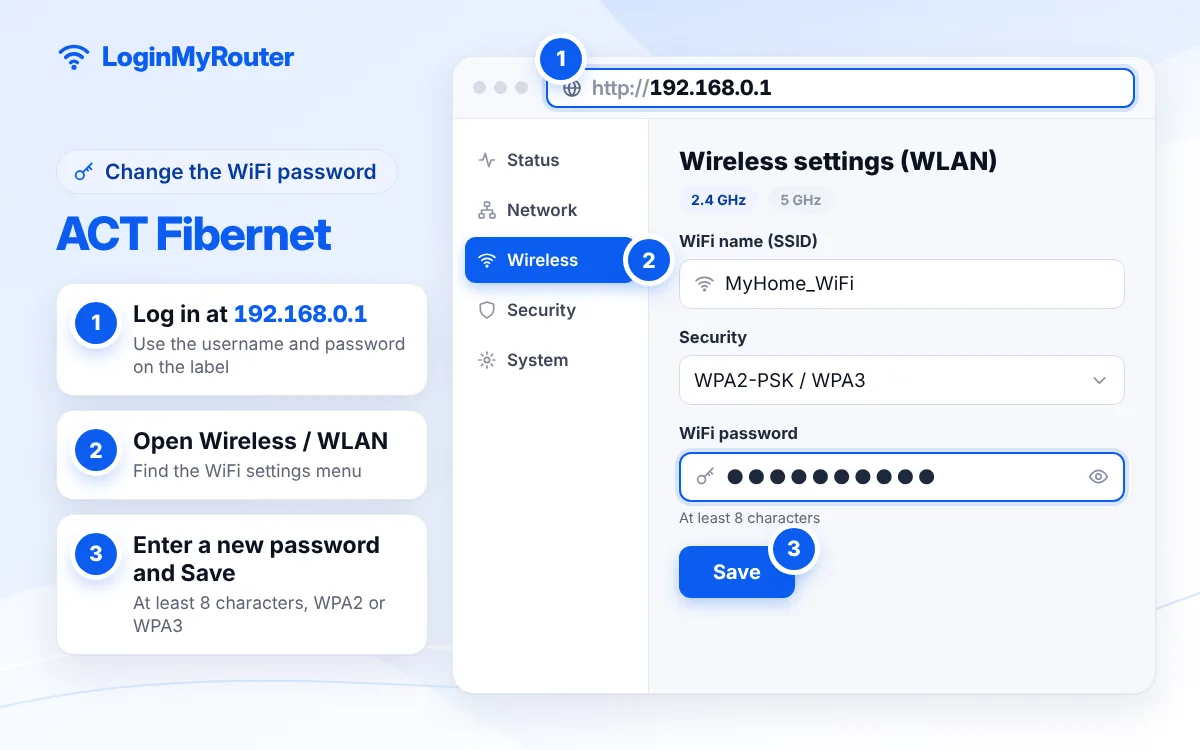
Change the default admin password as soon as you're in.
ACT Fibernet router login: 192.168.0.1 or 192.168.1.1?
TP-Link and D-Link routers mostly use 192.168.0.1, while some other models and older units use 192.168.1.1. NETGEAR routers also accept routerlogin.net, and TP-Link routers accept tplinkwifi.net, which saves you from remembering numbers. If you are not sure, read the gateway address from your device's WiFi details. Our guides for 192.168.0.1 and 192.168.1.1 cover each address and its common errors.
ACT account password vs WiFi password
ACT customers deal with up to three passwords:
- WiFi password: what your phone asks for when joining the network. Changed on the router.
- Router admin password: opens 192.168.0.1 or 192.168.1.1. Changed on the router.
- ACT account (login) password: used in the ACT Fibernet app and website, and on some connections also stored in the router to bring the internet up.
ACT's FAQ warns that changing your account login password may mean the router's settings have to be updated too, otherwise the internet will not connect. If you change it in the app and the internet drops, that is why. Ask ACT support to update the router if you are not comfortable editing the WAN page.
See who is using your ACT WiFi
On TP-Link routers check Network Map > Clients on newer firmware, or DHCP > DHCP Clients List on older ones. D-Link routers show a similar list under Status. Unknown entries usually mean your password has been shared further than you think; change it and use the guest network for visitors.
Reset an ACT router
Restart first: power off for 30 seconds and back on. If you are completely locked out, hold the Reset (or WPS/Reset) button for about 10 seconds until the lights flash, then let it reboot. The router returns to factory settings, which may also erase the internet settings ACT configured. Keep your ACT account details ready, or raise a ticket so ACT can set it up again.
Getting help from ACT
Go to actcorp.in, open Support, choose your issue and verify with your registered mobile number or 12-digit account number and an OTP. The ACT Fibernet app has the same support option at the bottom of the home screen. Raise a ticket for no internet, router replacement or a forgotten admin password.
Security tips
- Change the router admin password after your first ACT Fibernet router login.
- Use WPA2 or WPA3 with a password of at least 12 characters.
- Switch off WPS and remote management unless you rely on them.
- Update the firmware from the router's system tools page when an update is offered.
Typed 192.168.o.1 or 192.168.1.l and got nowhere? Fix it with our IP Typo Fixer. More providers are on the India router hub.
Frequently asked questions
What is the ACT Fibernet router login IP?
192.168.0.1 on most TP-Link and D-Link units, 192.168.1.1 on some others. The label under the router shows the right one.
What is the default ACT router username and password?
On many ACT-supplied routers the username is admin and the password is on the label. Newer TP-Link models make you create your own admin password at first login.
Does the ACT Fibernet app change my WiFi password?
The app's change-password option changes your ACT account password. Change the WiFi password on the router page instead.
My internet stopped after changing my ACT password. Why?
On some connections the router stores your ACT login password. After changing it, the router needs the new one too. ACT support can update it for you.
Can I use my own router with ACT Fibernet?
Usually yes, but you may need your ACT account details and the right connection type. Ask ACT support before replacing their router.
How often should I change my ACT WiFi password?
Whenever you suspect it has been shared, after guests or tenants leave, and at least a couple of times a year.