 भारत · Provider
Hathway Router Login Guide by Model
- Login URL
http://192.168.1.1- Default username
- Admin on ZTE and Genexis units (Tenda and some D-Link models ask only for a password)
- Default password
- The 12-character MAC ID on the back label (no colons or dashes) on ZTE/Genexis, or your current password
- Other possible IPs
- 192.168.0.1
Hathway router login depends on the box Hathway gave you. Hathway's own FAQ lists two groups: ZTE and Genexis fibre units open at http://192.168.1.1, while Tenda and D-Link routers open at http://192.168.0.1. On ZTE and Genexis the username is Admin and the default password is the device's MAC ID from the back label, typed as 12 characters without colons or dashes. Find your model below, log in, and you can change the WiFi name and password in a couple of minutes.

How to log in
- Check the label on the back or bottom of the router for the brand and model name.
- Connect to the Hathway WiFi or plug in a LAN cable. Turn off mobile data.
- Open a browser and type 192.168.1.1 for ZTE or Genexis, or 192.168.0.1 for Tenda or D-Link.
- On ZTE and Genexis, enter Admin as the username and the MAC ID from the label (12 characters, no special characters) as the password.
- On Tenda and D-Link DIR-842, enter your current router or WiFi password in the single password box.
- Click Login. If the defaults were changed and you do not know the new password, contact Hathway support.
Not working? Check the label on the back or bottom of your router.
How to change the WiFi password
- ZTE (F660, F602W, 612W): open Network Interface > WLAN > SSID Settings > Security and type the new WPA Passphrase.
- Genexis Platinum 4410: open the Net tab > LAN, change the SSID if you like and enter the new shared key, then click Submit.
- Tenda AC1200 A9: open WiFi Settings > WiFi Name & Password, set Encryption Mode to WPA/WPA2-PSK, type the new WiFi Password and click Save. Repeat for 5 GHz.
- D-Link DIR-615: open Wireless > Wireless Basics, enter the new Pre-Shared Key and click Apply.
- D-Link DIR-842: open Settings > Wireless, type the new password and click Save.
- Reconnect every device with the new password.
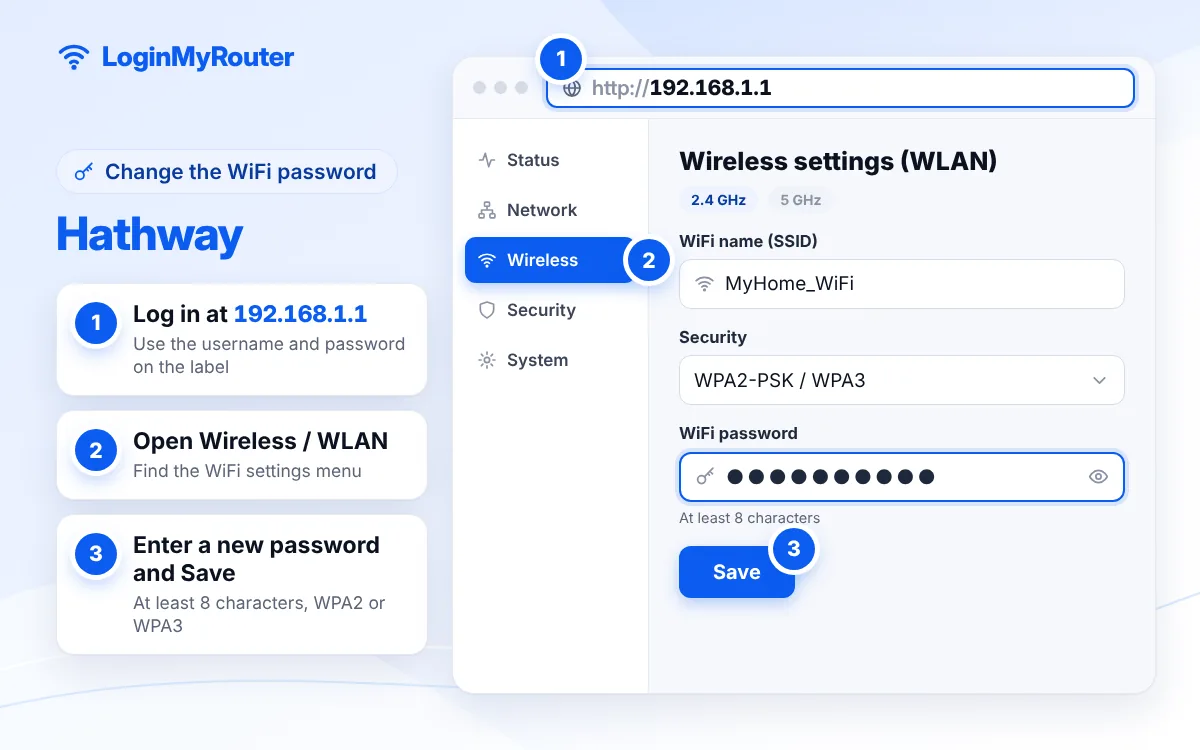
Change the default admin password as soon as you're in.
Brand / model
| Brand / model | Router IP | Username | Password |
|---|---|---|---|
| ZTE F660 / F602W / 612W | 192.168.1.1 | Admin | MAC ID from the back label (12 characters, no colons) |
| Genexis Platinum 4410 | 192.168.1.1 | Admin | MAC ID from the back label (12 characters, no colons) |
| Tenda AC1200 A9 | 192.168.0.1 | Not asked | Your current router password |
| D-Link DIR-615 | 192.168.0.1 | Admin | MAC ID from the label or your current password |
| D-Link DIR-842 | 192.168.0.1 | Not asked | Your current WiFi password |
| TP-Link TL-WR850N | 192.168.0.1 or tplinkwifi.net | See label | See label |
Hathway router login: pick the right address
Hathway installs different routers in different cities and plans, so there is no single answer. Fibre boxes from ZTE and Genexis sit on 192.168.1.1 (see our 192.168.1.1 guide). WiFi routers from Tenda, D-Link and TP-Link use 192.168.0.1 (see the 192.168.0.1 guide). Older cable-modem connections may have a separate WiFi router behind the modem; in that case, log in to the WiFi router, not the modem.
Password rules on ZTE and Genexis
Hathway asks for a WiFi password of 8 to 63 characters with at least one capital letter and one special character on these units. A few words joined with a capital, a symbol and a number, such as Mango@Tea47Rain, is easy to type on a TV remote yet hard to guess. Avoid your phone number or flat number, which neighbours can guess easily.
See devices connected to Hathway WiFi
ZTE and Genexis units show connected devices on their status pages, usually under Status or LAN. Tenda shows them on the home page or in its bandwidth control area, and D-Link under Status. If you find unknown devices, change the WiFi password and leave WPS off.
Resetting a Hathway router
Hathway advises avoiding a full factory reset unless a guide for your model says so, because it brings back other default settings too. For a ZTE unit the reset button sits next to the power button; hold it with a pointed object for 10 seconds. Afterwards the WiFi name and password return to what is printed on the label. If the internet does not come back, Hathway may need to reconfigure the connection.
Contact Hathway
Use the Hathway Broadband app, the self-care portal on hathway.com, or email broadband support at [email protected]. Mention your router model and customer ID so they can guide you to the right screen.
Security tips
- After your first Hathway router login, change the admin password where the model allows it, so it is no longer the MAC ID printed on the label.
- Keep encryption on WPA2-PSK (or WPA/WPA2-PSK on Tenda).
- Turn off WPS if you never use it.
- Do not paste your WiFi password in public chats or society groups.
Typed 192.168.l.l or 192.168.0.l? The IP Typo Fixer corrects it. Other Indian ISPs are on our India hub.
Frequently asked questions
What is the Hathway router login IP?
192.168.1.1 for ZTE and Genexis units and 192.168.0.1 for Tenda, D-Link and TP-Link routers.
What is the Hathway router default password?
On ZTE and Genexis, the username is Admin and the password is the MAC ID on the back label, entered without colons or dashes. On Tenda and D-Link DIR-842 use your current password.
How do I change my Hathway WiFi password on a ZTE router?
Log in at 192.168.1.1, open Network Interface > WLAN > SSID Settings > Security, enter the new WPA Passphrase and submit.
Why does Hathway reject my new WiFi password?
ZTE and Genexis units need 8 to 63 characters with at least one capital letter and one special character.
The MAC ID password does not work. What next?
Someone has changed it. Try your WiFi password, then contact Hathway support. A factory reset brings back the label password but also clears other settings.
Can I see my Hathway WiFi password in the app?
The dependable way is the router's own page: log in and read or change it in the WiFi settings for your model.