 Pakistan · Provider
192.168.100.1 Login for Fiber ONTs in Pakistan
- Login URL
http://192.168.100.1- Default username
- Printed on the ONT label (nameplate)
- Default password
- Printed on the ONT label (nameplate)
- Other possible IPs
- 192.168.18.1 192.168.1.1
192.168.100.1 login is the most searched router address in Pakistan, and the reason is fiber. When PTCL Flash Fiber, Nayatel or another fiber provider connects your home, the installer leaves an ONT (optical network terminal): the box the thin fiber cable plugs into. Many Huawei ONTs open their settings at http://192.168.100.1, newer Huawei models often use 192.168.18.1, and many ZTE units use 192.168.1.1.
Whatever the brand, Huawei's own instructions say the address, username and password are printed on the unit's nameplate. Here's how to sign in, change the WiFi and admin passwords, and fix the usual errors.

How to log in
- Connect to the ONT's WiFi, or plug your laptop into one of its LAN ports with a network cable.
- Read the nameplate on the bottom or back of the ONT: note the login address, username and password.
- Type http://192.168.100.1 (or the address from the nameplate) into the browser's address bar.
- Enter the username and password from the nameplate and click Log In.
- Type carefully: Huawei ONTs lock the login for one minute after three wrong attempts, and log you out after five minutes without activity.
Not working? Check the label on the back or bottom of your router.
How to change the WiFi password
- Log in to the ONT.
- Find the WiFi settings. On Huawei units open WLAN (on newer screens it sits under Advanced) and choose the basic WLAN or 2.4G basic network page. On ZTE units look under Local Network > WLAN.
- Select your SSID and change the name if you want.
- Set authentication to WPA2-PSK (or WPA2/WPA3) with AES.
- Type the new password in the WPA PreSharedKey or passphrase field and click Apply.
- Repeat on the 5 GHz page if your ONT is dual-band, then reconnect your devices.
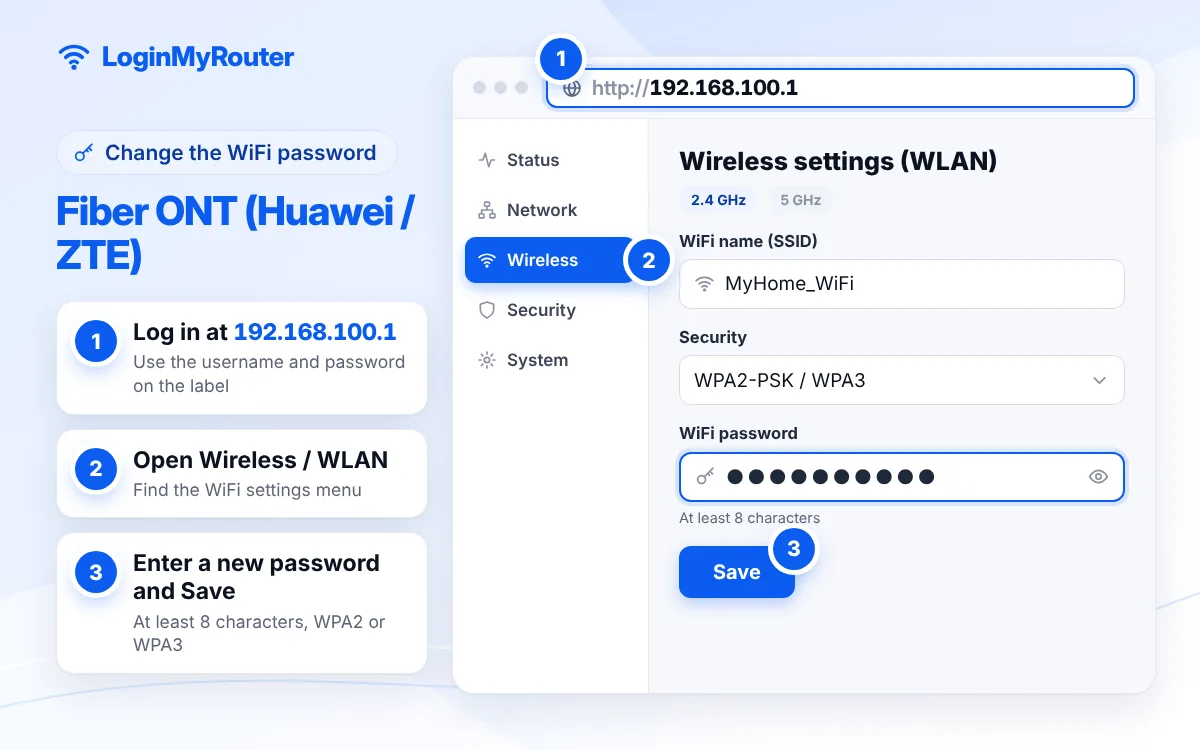
Change the default admin password as soon as you're in.
What is the 192.168.100.1 login page on a fiber connection?
It is the private address of the ONT on your home network. Only devices connected to that ONT can open it. Huawei used 192.168.100.1 on many of its home fiber units, which is why people search for “192.168.100.1 Huawei”. Huawei's newer OptiXstar guide uses 192.168.18.1 as its example, so check the nameplate before assuming. Our 192.168.100.1 guide also covers cable modems and other devices that use the same address.
192.168.100.1 change password: two passwords, two places
| Password | What it protects | Where to change it |
|---|---|---|
| WiFi password | Joining your WiFi | WLAN settings (steps above) |
| Web login password | The 192.168.100.1 settings page | Usually a System Tools, Management or Account Management menu |
Huawei recommends changing the initial web password after your first login. Do it, and store the new one safely: forgetting it means a reset.
Find devices connected to your ONT
Huawei ONTs list connected phones and laptops in the Status area (look for user device information), and ZTE units show them under the local network or WLAN status pages. Each entry has a name and MAC address. Change the WiFi password to drop unknown devices, or add one to the WLAN MAC filter.
Reset an ONT only as a last resort
The pinhole reset (hold about 10 seconds) restores the nameplate login and WiFi details. On fiber, it can also remove the internet configuration your provider applied, leaving you with WiFi but no internet until the ISP reconfigures it. Restart the ONT from the power button first, and call your provider before a full reset.
When the problem isn't your settings
Check the lights. A red or blinking LOS light means no fiber signal, and a PON light that keeps blinking means the ONT can't register with the network. Neither can be fixed from 192.168.100.1; contact your provider. Provider-specific guides: PTCL, Nayatel and StormFiber, or browse all providers on the Pakistan hub.
Security tips for fiber users
- Skip online lists of “super admin” ONT passwords; they belong to technicians and can lock you out or break your connection.
- Use WPA2 or WPA3 with a long WiFi password, and turn off WPS.
- Leave remote management settings as your provider set them.
Frequently asked questions
What is the 192.168.100.1 username and password?
They are printed on the ONT's nameplate. Providers and models differ, so there is no single pair that works everywhere.
How do I change the WiFi password at 192.168.100.1?
Log in, open WLAN (Huawei) or Local Network > WLAN (ZTE), enter a new WPA PreSharedKey and click Apply. Repeat for 5 GHz if you have it.
Why does 192.168.100.1 not open?
Your ONT may use 192.168.18.1 or 192.168.1.1, you may be connected through a separate router, or the address was mistyped. Entries like 192.168.l00.1 never load; our IP Typo Fixer corrects them.
Is 192.168.100.1 a Huawei address?
Many Huawei fiber units use it, but other brands and some cable modems do too. The nameplate tells you for sure.
My login is locked. What happened?
Huawei ONTs lock the login for a minute after three wrong attempts. Wait, then enter the nameplate details again.
Does PTCL Flash Fiber use 192.168.100.1?
Many Huawei units on fiber connections do, but the device you have decides it. Check the ONT label, or see our PTCL guide.