 Pakistan · Provider
PTCL Router Login and WiFi Password Change
- Login URL
http://192.168.10.1- Default username
- admin on most PTCL modems (check the sticker)
- Default password
- admin on many PTCL modems; otherwise printed on the sticker at the back
- Other possible IPs
- 192.168.1.1 192.168.100.1
PTCL router login takes about a minute. Connect to your PTCL WiFi, open http://192.168.10.1 in the browser and sign in; most newer PTCL broadband modems use that address, while older ones still answer at 192.168.1.1. The username and password are admin on many units, and if that fails the correct pair is printed on the sticker at the back of the modem.
This guide is mainly about the common job: PTCL WiFi password change, plus renaming the network, seeing who is connected and resetting without losing your connection. On PTCL Flash Fiber, the fiber box (ONT) usually has its own address; see our fiber ONT guide for that.

How to log in
- Connect your phone or laptop to the PTCL WiFi, or plug a LAN cable into one of the modem's LAN ports.
- On a phone, switch off mobile data so the browser uses your WiFi.
- Type http://192.168.10.1 in the address bar (not the Google search box) and press Enter. If nothing loads, try http://192.168.1.1, which older PTCL modems use.
- Enter the username and password. On most PTCL modems both are admin; if they are rejected, use the details printed on the sticker at the back.
- The status page opens with menus such as Wireless, Advanced Setup and Management on the left.
Not working? Check the label on the back or bottom of your router.
How to change the WiFi password
- Log in to the modem at 192.168.10.1 (or 192.168.1.1).
- Click Wireless, then Basic. Here you can see and change the WiFi name (SSID). Click Apply/Save if you changed it.
- Open Wireless > Security.
- Keep the authentication on WPA2-PSK (choose WPA2/WPA3 if your modem offers it) with AES encryption.
- Type the new password in the WPA/WAPI passphrase field. Use at least 8 characters; 10 or more with letters and numbers is better.
- Click Apply/Save. The WiFi drops for a moment; reconnect your phones, laptop and Smart TV box with the new password.
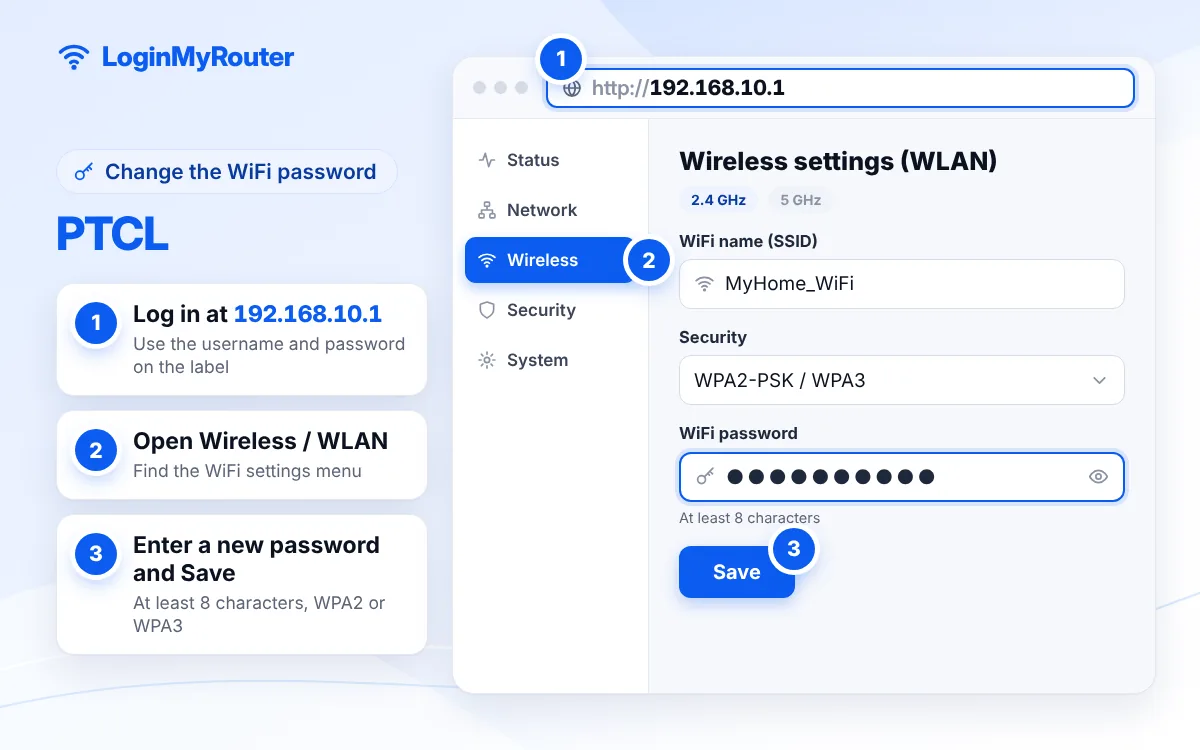
Change the default admin password as soon as you're in.
Which PTCL router login address does your modem use?
PTCL has supplied many modem models over the years, so the address depends on when yours was installed.
| Device | Address to try | Notes |
|---|---|---|
| Newer PTCL broadband modem | 192.168.10.1 | The usual answer for “192.168.10.1 PTCL” searches |
| Older PTCL DSL modem | 192.168.1.1 | Same menus, older firmware |
| PTCL Flash Fiber ONT | Address on the ONT label | Huawei units often use 192.168.100.1 |
Not sure? On your phone, open the WiFi network details and read the Gateway or Router value. Our full guides to 192.168.10.1 and 192.168.1.1 explain both addresses in more depth.
Change the modem's admin password too
Because admin/admin is so widely known, anyone on your WiFi could open the settings page and change your password back. After your PTCL WiFi password change, go to Management > Access Control > Passwords, choose the admin account, enter the old password and a new one, and save. Write the new one down somewhere safe; if you forget it, the only way back in is a factory reset.
See who is using your PTCL WiFi
Most PTCL modems list connected devices on a status page. Look under Device Info for a DHCP or client list, or under Wireless for Station Info. You will see device names and MAC addresses. If you spot something you don't recognise, changing the WiFi password is the quickest fix, because it disconnects everyone. Many modems also offer a MAC filter under Wireless to block a single device.
Resetting a PTCL modem (read this first)
The reset button is on the back of the modem. Press and hold it with a pin for about 10 seconds, until the lights change, then let the modem restart. This restores the default login and WiFi details from the sticker.
The catch: a reset also wipes the internet settings. On PTCL DSL that means the PPPoE connection, where the username is normally your PTCL landline number and the password comes from PTCL. If you don't have those details, contact PTCL before you reset, or you may be left with WiFi but no internet.
When to contact PTCL
Call PTCL if the internet light stays off or red after a restart, if your PPPoE details are missing, or if the modem itself seems faulty. You can reach them on the 1218 helpline, register a complaint through the support section of ptcl.com.pk, or use the official UPTCL app, which manages PTCL broadband and Flash Fiber accounts, bills, usage and complaints. The app is not described as a tool for changing the WiFi password, so use the modem page for that.
More Pakistani providers are listed on our Pakistan router login hub.
Security tips for PTCL users
- Never use your landline number, mobile number or house number as the WiFi password.
- Turn off WPS if you don't use it; it is an easy way in for nearby devices.
- Restart the modem once in a while and accept any firmware update PTCL pushes.
- PTCL staff do not need your WiFi password over the phone or WhatsApp.
Frequently asked questions
What is the PTCL router login IP address?
192.168.10.1 on most newer PTCL modems and 192.168.1.1 on older ones. PTCL Flash Fiber ONTs use the address printed on their own label.
What is the default PTCL username and password?
On many PTCL modems both the username and password are admin. If that does not work, use the details on the sticker at the back of the modem.
How do I change my PTCL WiFi password from my mobile?
Connect the phone to the PTCL WiFi, open Chrome, go to http://192.168.10.1, log in, then open Wireless > Security, type the new password in the WPA/WAPI passphrase field and tap Apply/Save.
Why is 192.168.10.1 not opening?
Check that you are on the PTCL WiFi with mobile data off, then try 192.168.1.1. Also check for typing slips such as 192.168.10.l; our IP Typo Fixer corrects these automatically.
Can I change the PTCL WiFi password in the UPTCL app?
The app's listing covers accounts, bills, usage and complaints for PTCL broadband and Flash Fiber, not WiFi settings. Change the password from the modem's page instead.
I forgot the admin password I set. What now?
Hold the reset button on the back for about 10 seconds to restore the defaults. Keep your PPPoE username and password ready, or ask PTCL for them, because the reset removes the internet settings as well.